How To: Build a Custom Ergonomic Computer Desk
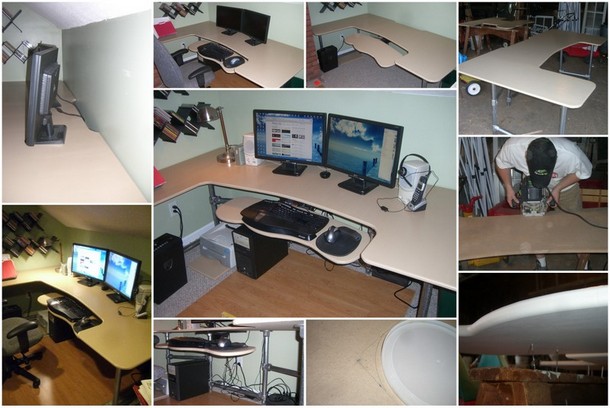
As a web developer, I spend LOTS of time at the keyboard. For me, having an ergonomic computer desk is an absolute essential. Recently, making the transition to working full time for myself, I decided that I needed a quality computer desk that would be adjustable and ergonomic. I quickly found myself frustrated with the high cost of ergonomic desks on the market.
Researching desks started to give me an idea of what I did and did not want in a computer desk. After a discussion with a friend I decided to make the plunge into building a desk to fit my needs.
Basic Strategy
I’m not a woodworker at heart, so I knew I needed to keep the construction of the desk simple. I decided to build the desk legs and foundation using Kee Klamp fittings and fence post. The aesthetic look isn’t for everyone, but it makes construction MUCH EASIER. Building the foundation of the desk is as simple as cutting some pipe and using an Allen wrench.
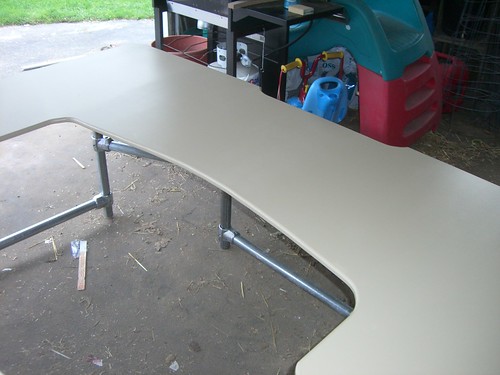
For the desk top I used a custom cut piece of MDF that I primed, painted and sealed (a must if you are using MDF).
To make the desk ergonomic I custom cut some of the remaining MDF into a keyboard tray and bought an articulating keyboard adjustable unit.
Getting Started
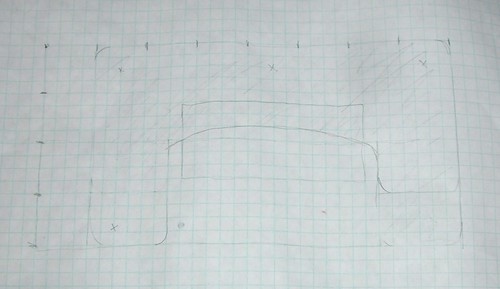
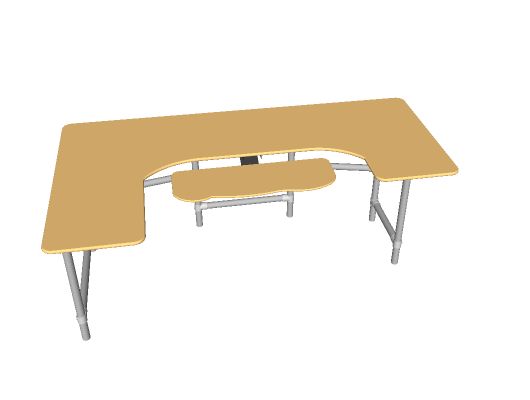
The first thing I did was make a plan. I drew out several sketches on some graph paper to see how I wanted the desktop surface to look. Having a particular space in mind, I made one side of the desk longer than the other.
Here’s my drawing:
Cutting the Top
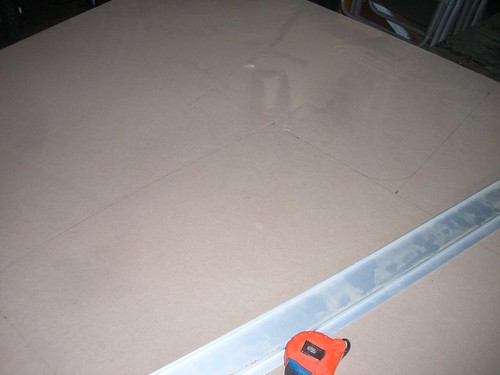
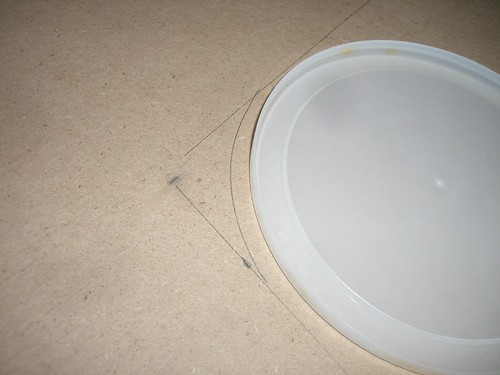
After I had my design, I marked the outline onto a 4×8 sheet of MDF. I used the top of a coffee can as a stencil for my rounded corners.
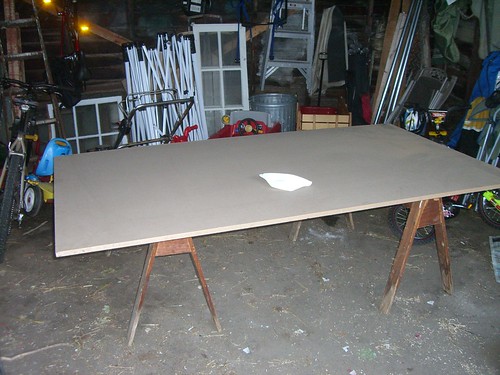
I supported it on saw horses and made the first couple of straight cuts with a circular saw. I used a straight edge to guide the circular saw so that the edges were perfectly straight.
Then I used a HIGH QUALITY jig saw with a SHARP BLADE to cut out the curves and corners.
TIP: You need to be careful with how you support MDF — it is not as study as plywood and could crack if mishandled.
TIP: I borrowed a high quality jig saw. The performance of a high quality jig saw with a sharp blade is astounding compared to a cheaper unit.
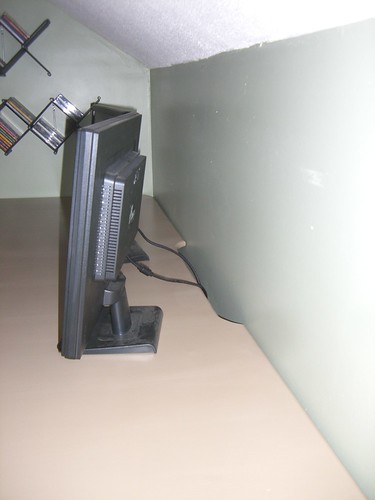
An idea I got while cutting the desk was to include a section in the back for cord management. I cut out an inch deep section in the back of the desk to accommodate power cords and various cables running off the desk.
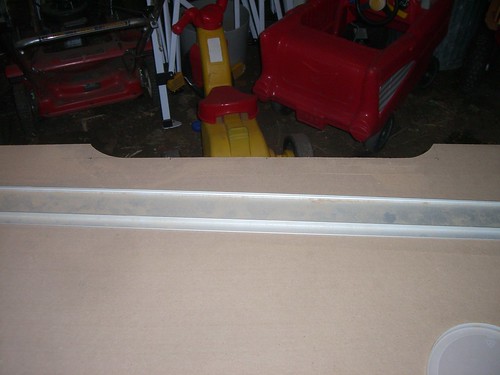
With that, the initial cut of the top was finished.
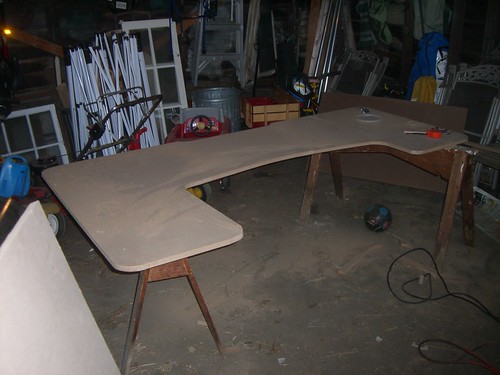
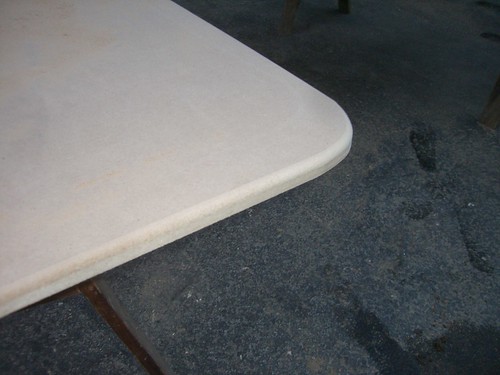
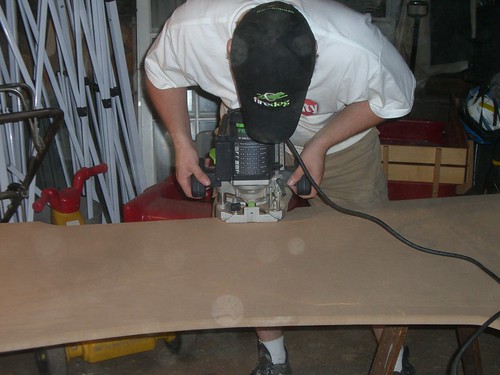
At this point the desk had a rough edge. I wanted a nice rounded edge. Thankfully, a friend of mine had a high quality router. With a simple pass around the edge, the desk top went from a rough cut piece of material to a smooth edged desktop.
Attaching the Base
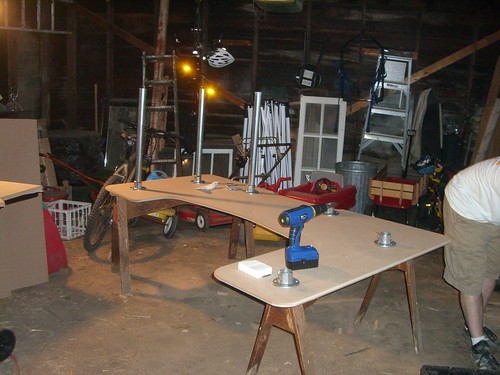
At this point we were ready to start attaching the fittings that would connect the legs to the desk top. I spaced out the Kee Klamp L61-7 fittings on the bottom of the desktop and screwed them in with 3/4″ #10 wood screws.
The fence post was cut (you can use a pipe cutter or a sawz-all — or just have the home center do it for you) to just under the desktop height (measure a height that works for you) and then attached to the fittings.
A Word About Kee Klamp Fittings and Fence Post
I chose to use Kee Klamp fittings on this project for several reasons.
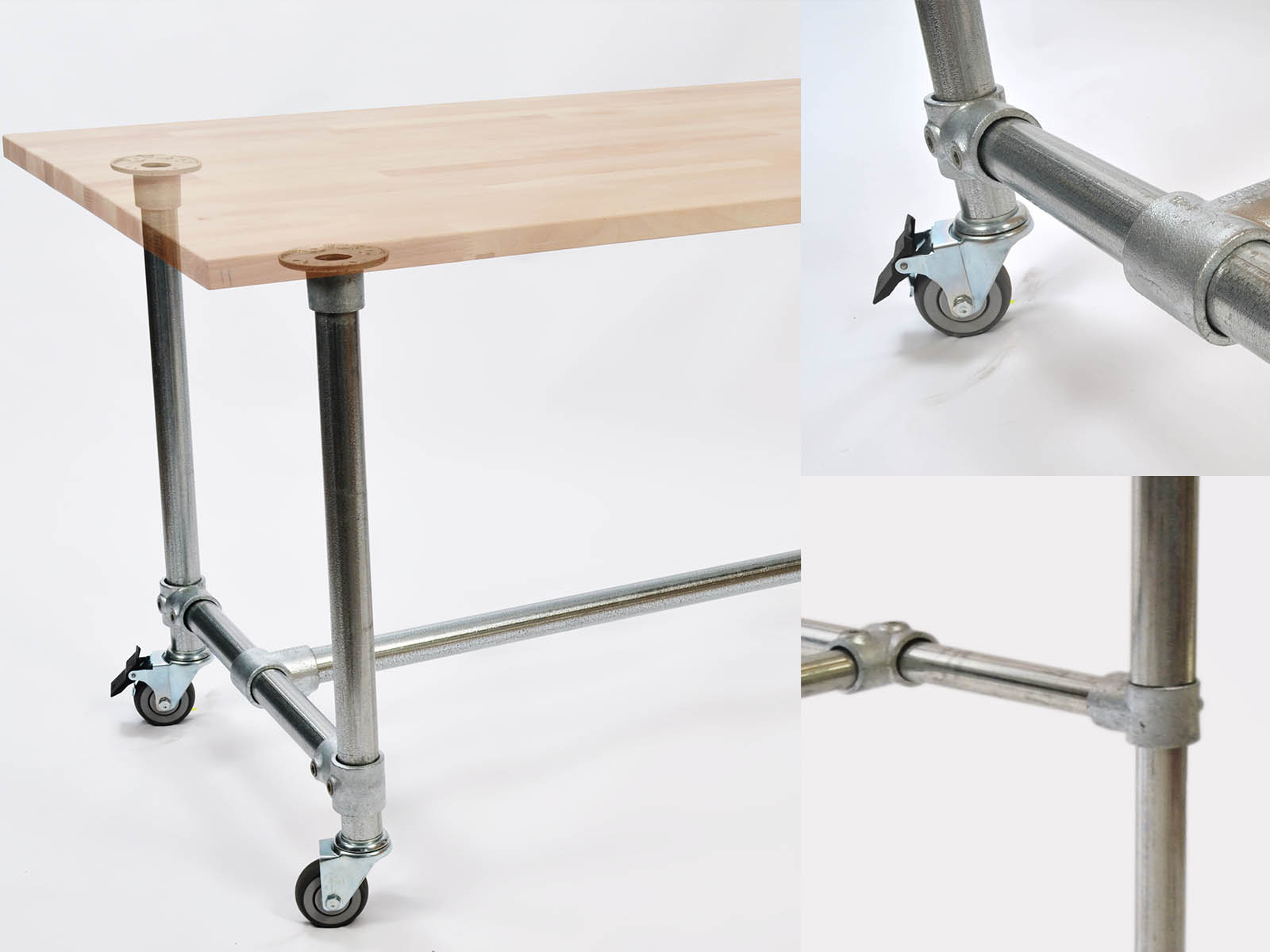
1. They are easy to use. I’m not a carpenter, so it was a quick and easy way to build a study foundation for a desk that would look good. Kee Klamp fittings slip onto pipe and then “bite down” into the pipe with a set screw. Normally they are used as an alternative to welding in the handrail world, but they work great for all sorts of DIY projects as well.
2. I am partner in a company that distributes them so I get a pretty good discount on them (if you’re a DIYer, mention this post and I’ll cut you 10% discount on the parts). They can be expensive, but when you consider the time and resources saved in other areas I think they are “worth” the investment. Literally, it took me minutes to get the desk upright once the desktop was cut out.
3. The Aluminum fittings (Kee Lite) have some aesthetic value for a modern looking office.
4. The size 7 (1 1/4″) fittings work well with fence post. I used about 3 1/2 – 8 foot lengths of galvanized fence posts that can be obtained at any home store. Fence post is a lot cheaper than the using galvanized schedule 40 pipe (not to mention it’s easier to work with too).
Building the Base
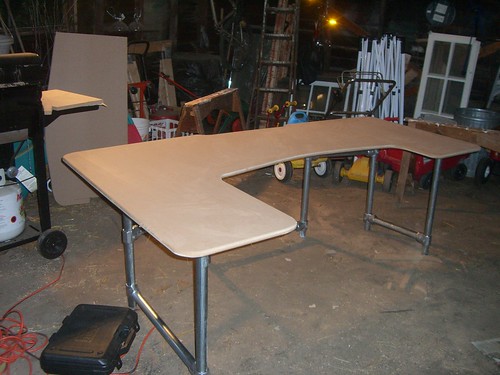
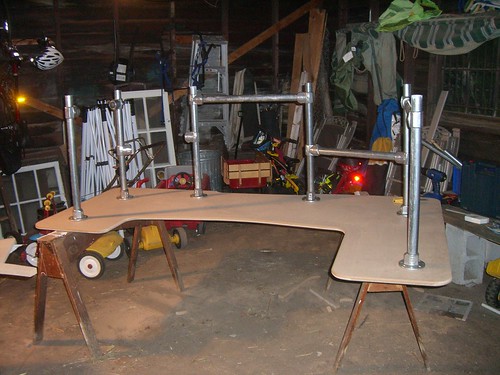
The base consisted of six uprights with a pipe running between each of the uprights. The cross supports made the entire unit very stable. They are necessary so that the horizontal forces on the desk (like when moving it) are not placed upon the MDF. I think without the cross supports it would be easy for the MDF top to crack and break.
The pipe is held in the fittings with a set screw that is tightened down with a standard allen wrench.
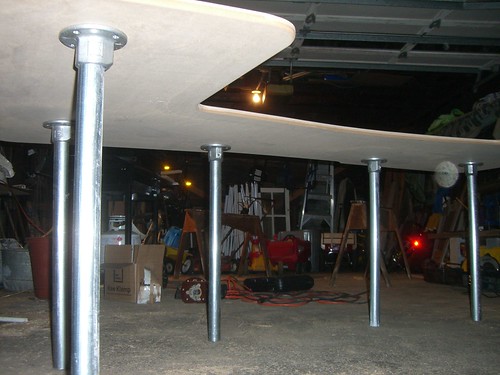
Here the cross supports are added with Kee Klamp L10-7 Fittings. They were staggered in height for even greater stability. Once the desk is in its final location the fittings can be adjusted and retightened.
Painting the Desk
Painting the MDF desktop is a must. Without paint, the first time you set a glass of water on your desk you’ll really wish you hadn’t! The MDF grain swells very easily and also continues to put off dust.
I painted the desk top in a thee part process.
1) Primed with a NON WATER BASED – BIN Primer
2) Painted with an Indoor Latex Paint
3) Finished with a Polycrylic to provide a protective finish.
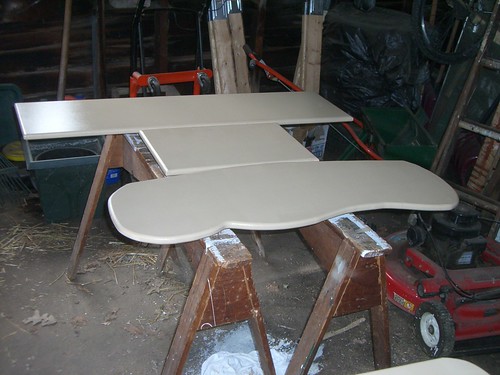
I put one coat of primer on the surface and two on the edges, sanding lightly in between each coat. I also wiped the surfaces down with a tack cloth. Using a mini roller made the paint go on quickly and smoothly.
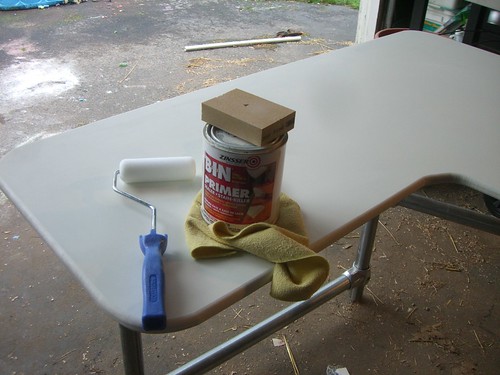
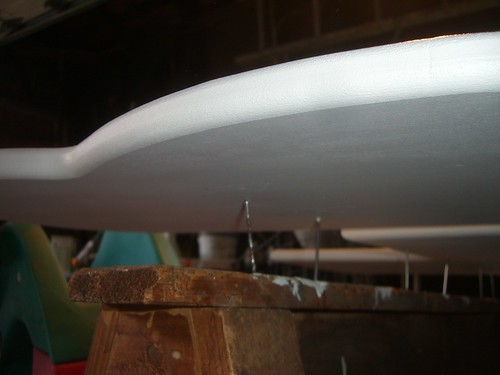
When I was painting both sides (for the keyboard tray and shelves), I supported them with nails driven into the saw horses. This allowed minimal damage to the underside of the painted surface.
Here is the paint and Polycrylic that I used.

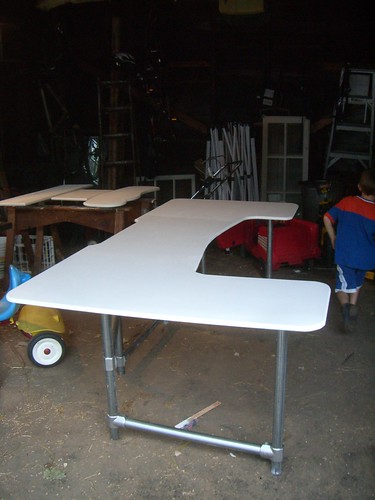
Finished Painting:
Finishing Touches
At this point the basic desk was done. Now the only thing that needed to be added was the keyboard tray. I ordered an articulating unit from www.ergoindemand.com. I found their customer service people very helpful.
Here is the desk in place, ready for keyboard tray.
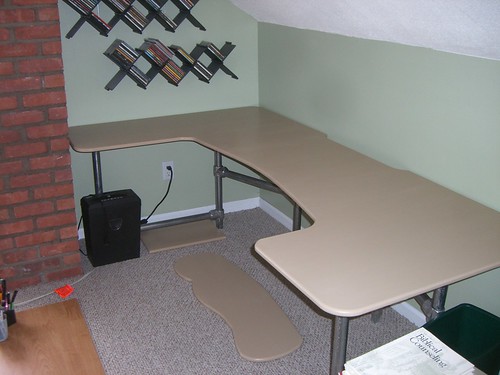
Once the desk is in place, I adjusted the cross pieces to make sure that they were spaced properly and evenly.
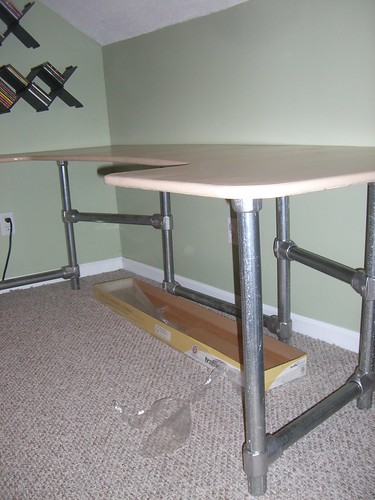
First I screwed the unit into the bottom of the keyboard tray.
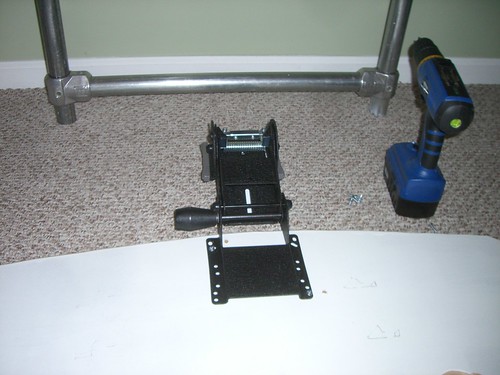
Then I screwed the track onto the bottom of the desk.
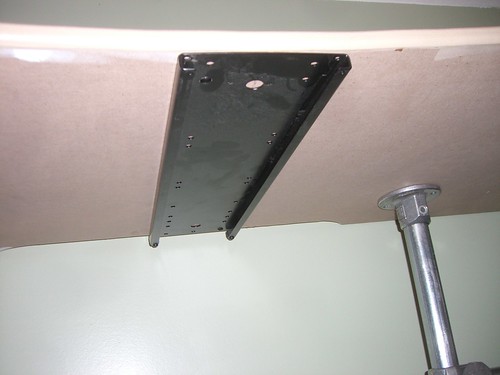
The keyboard tray slid right into the track and worked perfectly.
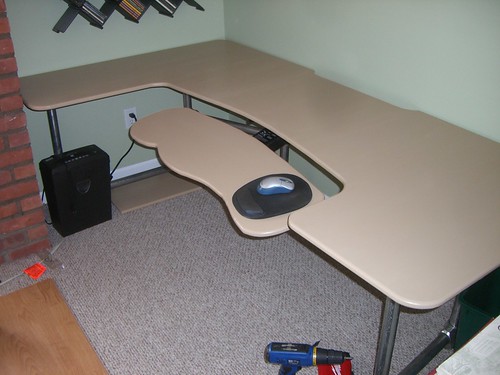
The cord management cut also worked very well.
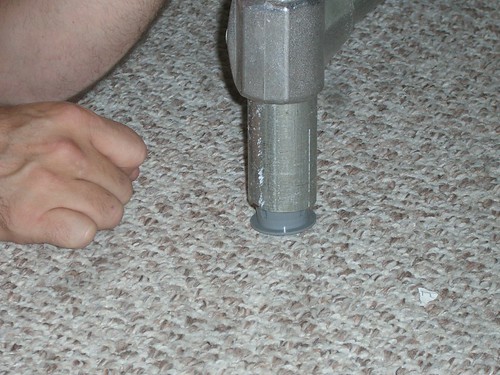
In order to keep the pipe from ruining the floor, I also added some plastic pipe end caps to make the desk easier to move around.
Admiring the Finished Product
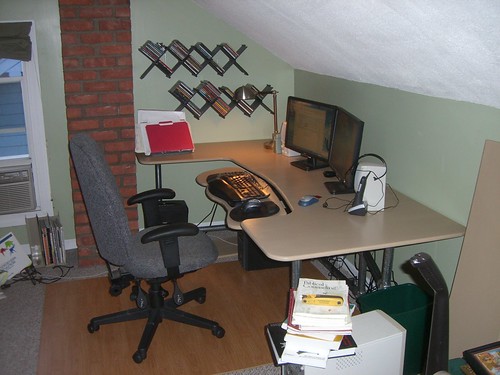
To finish it off I laid down some laminate floor so that my chair would roll. I made the extra shelves out of MDF in hopes of using them down the road (that’ll be another post).
Desk setup with 22″ wide screen monitors and ergonomic mouse and keyboard.
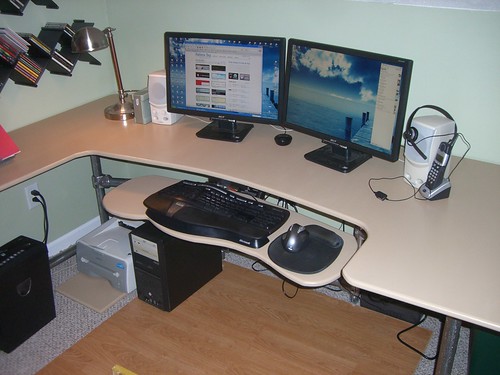
At the time of writing I have been using the setup for about two weeks and am very happy with how everything turned out.
Counting the Cost
I mentioned that this was cheaper than buying your own ergonomic desk. The cheapest ergonomic desk that I could find was around $600 (not including shipping), so what did this desk cost:
- 1pc. – 4×8 MDF – $25
- 10pc. – L10-7 Tee Fitting – $80
- 6pc. - L61-7 Flange – $65
- 6pc – 77-7 Plastic Plug – $9
- 4pc – 8ft Fence Post – $35
- Various Paint Supplies – $30
- Articulating Keyboard Unit – $100
Total Cost: ~ $350
$350 is NOT Cheap, but it is less expensive than the ergonomic desks that I could find on the market. Of course that also doesn’t include the fact that you get the satisfaction of building it yourself and customizing the desk to fit your space.

Shopping Cart


March 20th, 2009 at 3:04 am
Hey, your desk looks great. Good job!
April 3rd, 2009 at 7:40 pm
[...] it can be to use Kee Klamp fittings in DIY type projects. A couple months ago I built this ergonomic desk. Well, Adam from Louisiana got inspired and built himself his own multi-station desk based on [...]
April 4th, 2009 at 4:12 pm
Did you use the foam roller or a brush to apply the polycrylic? Do have any tips on applying it? Your instructions have been a big help in building my own desk – thanks!
April 8th, 2009 at 2:29 am
Wany nicer than any other instructional I’ve come across (And I’ve done much of research). Reminds me of biomorph desks. Just order 20 legs on ebay. This looks like the perfect project to use them on!
May 12th, 2009 at 4:25 pm
Where did the Articulating Keyboard Unit come from?
May 12th, 2009 at 4:29 pm
I got it from Ergo in Demand. Check here: http://is.gd/zdlR
May 12th, 2009 at 4:54 pm
Dude – nice job. Were you a firedog tech? I was. Fun times.
May 12th, 2009 at 5:37 pm
I am interested in how you did the chair mat, did you just use normal laminate and just slip them together? or did you glue/nail them together?
May 12th, 2009 at 5:38 pm
I’ve been struggling with what type of desk to use for an existing area in my house that is oddly shaped. I toyed with the idea of fabricating something myself but the logistics of it all seemed too daunting….until I walked through your post. Nice job! I’m inspired!
May 12th, 2009 at 5:42 pm
Great job!! Thanks for sharing this.
May 12th, 2009 at 6:27 pm
I wonder how sturdy that MDF will be when the desk gets piled with stuff or when someone leans or sits on that front edge?
For a little more money I would have bought a sheet of Baltic Birch plywood and glued on a laminate surface, then do the cutouts. The plywood has multiple thin laminations and no voids so routing it would make a finished edge and the laminate would be much smoother, more durable and more paperwork friendly. Plus there are laminate finishes that would complement the industrial pipe legs nicely.
But good work, I like the finished product. Someday I’m going to build a U shaped desk so I’m surrounded by work area where I can pile up stuff. I think I’ll use your pipe assembly for the legs, I like the look.
May 12th, 2009 at 6:31 pm
awesome ergonomic computer desk mr! the satisfaction of completing your own desk is so great. I’ve put up a long corner desk with 3 poles on the bottom left end. it looks great and is much higher than the average desk because i’m tall
May 12th, 2009 at 6:32 pm
I’m designing my desk right now too and my last desk I made, I used those standard drawer style rails for my keyboard. It didn’t last that long. I want to try the keyboard setup that you have. Do you recommend that one or anything better? How much weight can it handle? I usually rest my arms on my keyboard area a lot.
May 12th, 2009 at 7:20 pm
The King is also a very good keyboard tray. http://www.kingtray.com/
They are a little pricey but my office purchased one for me and I love it. I really appreciate being able to tilt the back part of the tray down; very comfortable.
May 12th, 2009 at 8:15 pm
For not being a woodworker at heart you did a REALLY nice job! Wow.
May 12th, 2009 at 8:31 pm
Wear a mask when cutting MDF. There are some nasty chemicals in it: urea-formaldehyde according to wikipedia.
BYOAC http://arcadecontrols.com/arcade.htm is arcade specific but has some helpful info painting and cutting MDF.
May 12th, 2009 at 8:59 pm
Beautiful work! I am going to build my own desktop soon, so I’ve bookmarked this article for future reference. Again, great work!
May 12th, 2009 at 10:18 pm
just a suggestion… you could have saved a lot of money actually buying table top legs as opposed to building your own. (and personally, i think it may have looked a little nicer). for example, a few of these from ikea would have been all you needed:
http://www.ikea.com/us/en/catalog/products/20056915
would have saved around $100, and several hours.
nicely done though.
May 12th, 2009 at 11:50 pm
I love this idea!!
Do you have the DIY of your chair mat? would love to see that
I have a layout of my desk and i really like the ikea legs so i think I’m going to go with them, Thanks microdot
May 13th, 2009 at 12:55 am
Great looking desk! I think $350 is a great price for a desk like this. MDF is a great material for desks. I’ve got 3 in my office that I built 7 years ago, and they’re still going strong.
A manufactured desk like this would easily go for more than $1,000.
Your paint + poly looks like a very nice finish and will easily be renewed after a couple of years of use.
GREAT WORK, and very nice how-to.
May 13th, 2009 at 12:57 am
Oh, one more thing….
I used two pieces of MDF for my desk tops…. glued and screwed together.
Heavy and rigid as hell.
May 13th, 2009 at 2:02 am
Very nice. I made one from plywood and IKEA legs. You can see it here. http://www.flickr.com/photos/78712082@N00/sets/72157616398918905/
May 13th, 2009 at 2:51 am
Lots of great comments here are my responses to a few:
@nwgray
No.. never worked for them, but my buddy Dan (in the photo) worked at Circuit City.
@Donovan
Yeah.. normal laminate from home depot. I duck taped them together on the back. Works great!
@KLC
The MDF can be a bit flimsy, but given my configuration I haven’t had any issues with it. The outside edge is solid, and because of the keyboard tray I never really lean on the middle of the desk except to write on.. and it’s totally fine for that.
@mr x
The great part about using the fence post on the legs is that you can make the actual desk height any height you want.
@Michael Bui
I got my keyboard tray from http://ergoindemand.com. I was hesitant to spend $100 on a tray, but it has been worth it! It’s VERY solid and can support my arms resting on it. How much weight? Hard to say exactly, but the tray manf. might be able to tell you more.
May 13th, 2009 at 3:58 am
I think it is worth mentioning that Ikea does have a fairly configurable system called Galant that is actually rather similar in construction…but most importantly in price. Obviously if you can’t make an Ikea configuration that works, you’ve got to go the custom route, but is always worth looking at the trade-offs. While this desk cost $350 to make, there was a fair bit of time involved!
Ikea’s approach to solving the “ripping the MDF apart while moving” issue is to attach the legs to a whole steel frame and the MDF (laminated with your choice of Ikea laminate flavor) just rests on top. Obviously this is not an option when doing DIY unless you want to get into a bunch of metal fab/welding.
As others have pointed out – Ikea’s legs can work as part of your own custom system, or you could integrage some Ikea components and others of your own.
When considering this problem I ended up finding an Ikea configuration that worked, and then just keeping an eye on Craigslist for a good deal on a “mostly right” setup, which I can tweak with a few retail parts.
May 13th, 2009 at 4:14 am
two monitors will hurt your neck check.. my website for more useful DIY ergonimcs..
http://www.izobrazba.naspletu.com/learn.html
May 13th, 2009 at 5:19 am
Great – Thanks for posting this. I’m looking at a similar
Any thoughts for adjustable height legs?
May 13th, 2009 at 5:09 pm
It’s not clear from your writeup if you also painted the underside of the desk. It’s a good idea to finish both sides of a project in the same manner to avoid warping. Any wood product will move slightly over time as its moisture content changes with the humidity. If the underside is unfinished (or finished differently) it will change moisture content at a different rate and can lead to warping.
May 22nd, 2009 at 3:28 am
Height Adjustable version of this here: http://gadgetwise.blogs.nytimes.com/2009/05/11/how-to-make-your-own-ergonomic-computer-workstation/?partner=rss&emc=rss
May 22nd, 2009 at 3:32 am
Never mind ^ sorry = (
June 5th, 2009 at 9:02 pm
Hey, in case you guys don’t have the time and the skills you might want to check out this site !
Biomorphdesk.com
June 5th, 2009 at 10:12 pm
When you consider the prices at Antho Cart, $350 is cheap. Looks good.
June 8th, 2009 at 8:42 pm
This is my favourite:
http://www.biomorphdesk.com/1-888-302-DESK/maxo/overview.html
I might get this one in the next month or so
June 19th, 2009 at 3:23 pm
Would the unit be any sturdier if you used another set of the L61 flanges as feet at the bottom of the legs?
June 19th, 2009 at 3:40 pm
@Jody F.
I don’t think that would add much stability. With the cross bracing the legs are already rock solid. The only give in the whole thing would be in the front part of the MDF top (but mine has been fine.. with no flex)
June 19th, 2009 at 11:54 pm
Did you work off a template or measured drawing for the top, or did design it yourself?
Thanks.
June 20th, 2009 at 1:14 pm
@fibaldwin
I pretty much sketched it out myself on graph paper:
http://farm4.static.flickr.com/3039/2770274783_e9c2df4616.jpg
I basically traced off the size of the MDF, to scale and then just added curved corners with the top of a coffee can.
June 25th, 2009 at 5:29 pm
This is a great desk. I am planning on building one like it very soon. My only question, is what thickness of MDF did you use? Thanks in advance!
June 25th, 2009 at 5:35 pm
@Adrian
3/4″ is the thickness of the MDF
Glad to hear your going to dive in and try it out for yourself. Send us some pictures when you get done and we’ll post a followup in the blog.
June 30th, 2009 at 3:09 pm
How did you arrive at the shape you used for your keyboard drawer? It looks great, just curious about how you chose that.
June 30th, 2009 at 3:11 pm
@jodyf
I used the edge of my ergonomic keyboard for the middle and the size of my mouse pad on either side. That way it works for righties and lefties
July 5th, 2009 at 10:23 pm
Hi.. is it good to build drawers with this type of desk? …is the mdf strong ?.
July 6th, 2009 at 1:24 pm
@justin
I’m hanging my key board tray off the desk, so i”m sure it would support a shallow drawer just fine.
August 16th, 2009 at 4:04 am
Hello! I enjoyed this article, to the point where I got inspired and am now building my own desk after my old staples particle board desk got partially destroyed during a move. It’s quite different from yours, (for starters it’s a corner desk) but then variety is the spice of life. When I finish I plan on putting pictures up, and if anyone is interested in seeing it i’ll post another comment with a few links.
August 23rd, 2009 at 10:38 am
Err. You can also just get wheels that roll on carpet… That sheet of laminate looks incredibly silly.
August 31st, 2009 at 9:41 am
Does anyone know of any good UK based Key Lite fitting stockists?
September 16th, 2009 at 5:44 pm
What were the radii of the fence posts?
October 5th, 2009 at 4:34 pm
Do the Kee Klamp flanges you use to attached the pipe to the desk allow for the pipe to go through the flange? I’m wanting to extend some of the pipe up through the desk to use as support for a monitor arm/shelves while still supporting the desktop.
October 5th, 2009 at 9:10 pm
@Jack, yes, they pass right through the flange fitting.
October 7th, 2009 at 8:36 pm
Very nice. Are all Kee Klamp parts only available online or are there brick and mortise vendors? Also, how did you figure the distance necessary between each leg? I’m planning a 2 level desk, is there something I should I should consider? The second level won’t be for displays, those are mounted on the wall, it will be used for external drives, docking stations, etc, so not extreme weight.
October 9th, 2009 at 8:42 am
@Tony
Kee Klamps are pretty hard to find in local stores, and usually the selection isn’t there. You won’t find them in big box stores, that’s why our site is so popular, this is one of the few places you can get them.. in the selection that we have.
I didn’t really use any exact measurement for the distance between the legs. I just wanted it to be sturdy and so placed them every two or three feet.
A 2 level desk could be done, in fact I have an add-on shelf for mine that I haven’t gotten around to installing quite yet. The best way would be to canteliver it off of two of the legs with a L10-7 fitting.. a pipe sticking out and the a L70-7 fitting Attach the shelf with the two screw holes and the slip the pipe through the fitting. For an added touch I’d bet some pipe caps (like the ones for the legs) to stick in the end of the pipes for aesthetic value.
If you end up making that shelf, let me know.. I’d really like to feature it on the blog.
October 17th, 2009 at 5:25 pm
Wow… that’s a fine desk. Very good work. Too bad that I can’t find keyboard’s rail support like yours in Indonesia.
November 21st, 2009 at 9:56 pm
did you pick the kee klamp brand for a specific reason? I would think that you could use some basic chain-link fencing materials to do this. The flanges might be similar in price but replacing the full-tube style tees with the pipe-end and strap method that chain link fencing uses should yield a pretty solid structure at a fraction of the cost. 10 kee klamp tee are $100 shipped!
December 4th, 2009 at 5:49 am
Where did you get the keyboard tray unit?
December 4th, 2009 at 2:06 pm
@Jeff,
I got it from this site:
http://www.ergoindemand.com/Keyboard-Tray-Systems-medium-line.htm#02-CML258
December 4th, 2009 at 2:56 pm
you can also get the keyboard try hardware from Lee Valley for a couple bucks less
http://www.leevalley.com/hardware/page.aspx?c=2&p=32493&cat=3,43597,61305&ap=1
December 16th, 2009 at 8:14 am
Has anyone found a cheaper keyboard tray arm? 100 dollars seems pretty steep for some metal, a hinge, and a rail.
January 6th, 2010 at 10:10 pm
I came across this and I am going to try it. Seeing as how I cannot buy a desk for My needs. I will explain why. I have 101″ of width to work with. In this space I have to fit 3 pc’s a set of drawers, a printer, and two subs for the audio, one of which is an 8″ jvc home surround. Thank you for posting. Wanna come over and do it for me?
January 18th, 2010 at 2:15 pm
That is one fantastic desk, so much so I have asked our maintanence guy to take a look and make 10 for our new offcies, as the desks here in the UK cost in excess of £600 each!
Graham Gallagher.
Outdoor TV Cabinets
January 21st, 2010 at 1:43 am
Have you ever tried building an ergenomic desk that raises and lowers to the persons needs? I sure would be interested in it.
February 2nd, 2010 at 2:00 pm
Yea dude mad good job do you think you could send me an email with the layout of the entire desk. Would be extremely helpful
Email is coreyk_34@yahoo.com
February 3rd, 2010 at 5:18 pm
Hi! Very informative article. That is a Thanks for sharing!