Tuesday, July 27, 2010

Every once in a while we stumble upon some truly amazing projects. This bus was a conversion from an old yellow school bus. This is upcylcing at it’s very best. The interest that we have in this project is that it uses Kee Klamp fittings in a number of different areas of the construction.
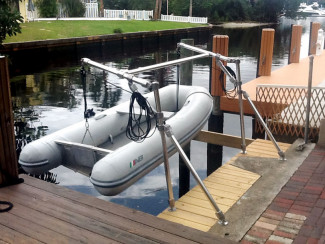
Here the author shows the use of Kee Klamp in the construction of a wind turbine support
The turbine is placed on top of a 10’ piece of 1-1/2” Schedule 40 Galvanized Pipe.
C50-8 Connectors secure the braces to the upright.
The upright is connected to the decking with a 62-8 Flange.
The bracing is connected to the deck with C58 Swivel Flanges.
Visit the author’s site to learn more about the Bus project and his wind turbine.
Interested in making you own wind turbine to go on top of this post. Visit Make’s new project area and check out this project:
Make a Wind Generator

Thursday, March 11, 2010
While reading the the latest issue of Make Magazine I came upon an article that talked about transforming the Maker Faire benches into display units. These “Maker Shed” store displays are being used to feature Make Shed products in FYE stores in California.
You can see more pictures of the transformed Maker Shed in our favorites.
The Beauty of Reusability
One of the great things this features about the Kee Klamp fittings is their reusability. They aren’t the cheapest thing in the market to build with, but they’re durable and if you don’t or can’t use what you originally built any longer, you can re-make it into something else. This isn’t just environmentally friendly, it’s fun! Fun to be able to take apart something you are not using any more and reuse it all over again.
Yesterday I posted a link to the standing desk that I built and and I videoed this segment talking about the benefits of the parts.
Wednesday, March 10, 2010


This project got stared the other day when I read and discussed a couple of posts on the Lifehacker web site about the health risks of working while sitting all the time. I got inspired to do something about it and decided that I would build myself a desk that I could stand at. One of the goals that I had for the desk was to make it versatile enough to be used in a number of settings. My thought was something that I could use in my office, but might also be used with a treadmill.
In this video I talk about the idea for the standing desk:
Design
My design consisted of a telescoping pole that went from floor to ceiling and a perpendicular pole that could support a keyboard or laptop. I sketched it out on graph paper:

Sketchup Model
Thanks to my pal Sam, the Sketchup Master, you can also download this project and play with it in Sketchup. Download it here from the 3D Warehouse.
Building the Standing Desk
Design is one thing, implementation is another. What I found when I went to build my desk is that the telescoping pipes did not have enough force to stabilize the unit. Basically at this point I had two options. 1) Attach the flanges directly to the ceiling and floor or 2) build a tensioning device to tighten the vertical pole. Both are valid options. Because I wanted my desk to be somewhat portable, I decided to go for the tensioning option. If that’s a little too risky for you, you can go with option one (attaching directly to the ceiling).
Parts List
| From our Web Site | From Other Stores |
In this video I talk about the advantages of using Kee Klamp and Kee Lite parts:
Basic Costs
Everyone always wants to know, how much does it cost? For all parts for the project ~$200.
The lion share of the cost is in the pipe. You may be able to cut costs by 1) using shorter lengths of pipe, 2) using steel instead of aluminum, 3) finding a local pipe supplier and cutting the pipe yourself. You are paying something for the convenience of the pipe being pre-cut and sent to your house in bubble wrap!
You could also save by not doing the tensioning device and attaching the pipe directly to the ceiling. That would eliminate all the threaded rod and hardware and perhaps even the need for the collar and the 1” – 6 foot length of pipe. There are definitely ways to chop down the cost if this is a major factor for you.
Basic Assembly Points and Tips
A picture is worth a thousand words here. I’ll try to refrain from being verbose. Watch the videos, the will give you most everything you need to know.
Setup the Vertical Telescoping Pipe
Slide the 1” pipe into the 1-1/4” pipe. You must be using SCHEDULE 40 pipe for this to work properly. They have a near perfect telescoping relationship. The 1” pipe should slide freely in the other pipe.
Slip the collar onto the 1” pipe and set it at the basic height for your ceiling.
In this video I talk about how the telescoping relationship works:
Slip on the L45 to the larger pipe and tighten it on at the working height of your desk (you can adjust this after it is setup).

Attach the L61-7 to the bottom of the pipe and tighten it to the pipe.

Two Options For Ceiling Attachment
In this video I overview the two attachment methods:
1. Simple / Permanent – Attach fitting to pipe and ceiling
The simplest way to attach the vertical pipe to the ceiling is just to attach the L61-6 to the 1” pipe an screw it into the ceiling. That will give an unquestionable stability to the vertical pipe. There are many different ways of attaching to the ceiling if you are using this method. You could even use a LC58-6 Swivel Flange to attach to to a angled ceiling.
2. Semi-Portable – Tensioning Arrangement
I chose to be a bit more adventurous and setup a tensioning device with a threaded rod and a couple of nuts. This arrangement is also very stable, it just requires some more attention to detail and tightening.

The picture is probably the best explanation here. The threaded rod has two nuts. On the bottom the nut actually sits perfectly in the 1” schedule 40 (couldn’t have been better if I planned it). On the top there is a nut, a lock washer and a regular washer (these all came in a package together.

To stabilize the rod inside the fitting I used a 1-3/8” rubber stopper (another amazing fit!!). I drilled hole in the stopper and pushed the rod into the stopper. The stopper keeps the rod from sliding around in the top fitting while you are tightening. IMPORTANT: the rod is providing tension by pressing on the washer and the washer presses on the flange. Be careful that you don’t feed the rod too far through or it may end up poking into your ceiling.


On top of the flange I placed a pad that I actually ripped off the bottom of a furniture pad (the third perfect fit in this project!). You could use any foam rubber type material, just cut it into a circle that matches the circumference of the flange.


Create the Extending Arm Desk
I used a 4 foot section of pipe to make my desk arm. You can see from the pictures that I could probably go shorter if I needed to. The pipe caps are hammered into either end (put a cloth to protect the aluminum) and give the pipe a really nice finished look.

The L70-7’s are used to attach the pipe to the desk surface. Just attach the shelf with some basic screws and tighten the arm pipe into the L70’s.


After you attach your shelf, slide the arm into the L45 on the vertical pipe, set the angles and heights and you’re pretty much ready to go!

Finishing Touches
Adjust the desk to fit your working height. Make sure you arms are bent properly. You have adjustability here, use it to your advantage!
The components used in this project are not “tight tolerance” which means, even after you tightened them down there is a little bit of “flex” in them in the opposing direction. In a situation like this where there is only one support it helps to add a some shim material to make sure the pipe is perfectly level in the fitting. I used some simple silicon plumbers pad. You can pick it up for a $1 at the home store and all you need is a tiny piece

Stand and Work!
My experience with the desk has been fantastic so far. I am a natural “phone pacer” so I like the idea of being able to move around a little bit while I’m working on my feet. I find that it’s a great place to start the day, checking email, brief correspondence, writing blog posts, and doing creative work. I find that for intense programming I still want to sit down (probably mostly because of the monitor setup), but for a lot of other tasks its great to have an alternative spot to work.


Other Ideas
If you read the original Lifehacker article, it talks not only of standing while working, but also the possibility of working on a treadmill. I’d like to experiment with this idea to see if it’s effective and safe. Another idea from a friend in the UK was to use a small stair stepper unit under your feet to exercise that way while standing an working.
Another idea I have is to attach another post to support a flat screen monitor. This post would need to extend out from the pole so that it’s not right in my face, but I think it’s definitely doable and you make the desk more ergonomic by moving up the viewing area.
This type of desk configuration opens up a world of ideas. I think of a desk that is mounted on two poles that could be adjusted up and down as needed. There are really so many ideas of what you build with pipe and fittings. Looking forward to hearing your response and more ideas in the comments.
Here I am in my completed office full of furniture built with Kee Klamp and Kee Lite components:

You can find out more about the desk I’m sitting at in this picture by reading my post on Building and Ergonomic Desk. Check out the Flickr set of photos for more pictures.
Friday, March 05, 2010
Recently we posted a completed computer gaming chair from Don Sturrock. I am in the middle of a project (details coming soon) where I want to mount a monitor to a horizontal pole. I remembered Don’s project and asked him how he attached his monitor. He was kind enough to share the details and a few pictures. I thought others would be interested on how to attach a monitor to pole or pipe, so here are the details:


Details from Don
For my monitor I used two flat 3"x5" nail plates from Home Depot and a 6" long piece of alderwood 1x4. I attached the nail plates to the 1x4 with six #4 x 3/4" screws and then lined up the monitor mount holes onto the plates, drilled them out, painted it with RustOleum Flat Black Enamel and used the screws from the monitor to attach to the plates (see pic). The metal clamps have a good bite on the pipe so I feel the monitor is secure (22" monitor).
I also sent a pic of the underside of the keyboard. you can see the velcro that attaches it to the 16" long 1x4 alderwood and the plastic clamps (sorry for the fuzzy picture).
Downsides of this Approach
In looking at this mounting approach, it may be inexpensive but there are probably some downsides to be recognized
- Not sure how this will work on a vertical pole – Don mounted to a horizontal pole (that’s what I’m planning on doing.) I’m not sure how this would hold if mounted on a vertical pole or pipe.
- Scratches up the pipe – Judging from the pictures, adjusting the monitor (because of the bite of the clamps) scratches up the pipe pretty good. If you’re doing something that has to have really clean look then this might not work for you.
The Alternatives
A decent pipe mount looks like it’s going to cost you a couple of dollars.
All pricing as of March 5, 2010.
Speak Up.. add you 2 cents.
If anyone else knows of (or has an idea about) how to inexpensively attach a monitor to a pipe or pole, then please leave a note in the comments or shoot me an email: chris – at – simplifiedbuilding.com
Monday, February 01, 2010
The most recent issue of Wired Magazine (Feb 2010) has a cover article entitled “Atoms are the New Bits” written by Chris Anderson. The article outlines an industrial seismic shift in how the manufacturing world is changing to reflect the Internet and the world of open source computer software development.
Because of the lowering cost of expensive manufacturing equipment, smaller companies can now get involved in producing their own goods for special and unique products. Because of the Internet, there is a global market to reach when the product might only appeal to a very small sliver of the population. Bring these two things together and you have new industrial revolution where people can actually build a sustainable businesses by manufacturing niche products in their garage.
As the general manager of an online shop that sells connectors and fittings, this article was invigorating and inspiring. Back in 2006 when we first got started, one of our first big jobs was to provide tables for O’Reilly Media’s Maker Faire. They loved the “tinker toy” of building with Kee Klamp fittings. These components can be used to build just about any tubular structure simply and easily. We loved the faire and even met some of the folks who were featured in Chris Anderson’s article (namely Jim from TechShop). The faire was an exciting time, and while people groaned at the price, they loved the concept.
The New Industrial Revolution and the future of Simplified Building Concepts
Simplified Building Concepts has been a work in progress from the beginning. We’re not one of those companies that started off with a crystal clear vision. Over time we shifted this way and that to respond to the market. More recently our focus has turned to the development and sale of safety products which ultimately led us to produce a new web site exclusively focused on safety: Simplified Safety.
With the creation of the new site, Simplified Building Concepts is rediscovering its roots in the sale of simple connectors and fittings. After reading this article I hope we can become an online resource for the growing number of folks involved in manufacturing out of their garage; providing them with quality parts and pieces that can be used to produce great OEM products.
Every age has its amount of “interesting things” that are happening. I enjoyed hearing about this new wave of garage styled industrial entrepreneurs and hope that our business can help them bring their products to market quicker and easier.
Making it Easier with Google SketchUp
One of the ways that we are trying to make it easier for industrial entrepreneurs is by providing SkechUp models of our components. This allows product developers to model their product before they build. Take a look at our SketchUp component library to view both components and projects.